Crossword Search: Word Puzzles
- 4.9
- Rating
- 100.00K
- Installs
- Free
- Price
 Analysis by App-foxy
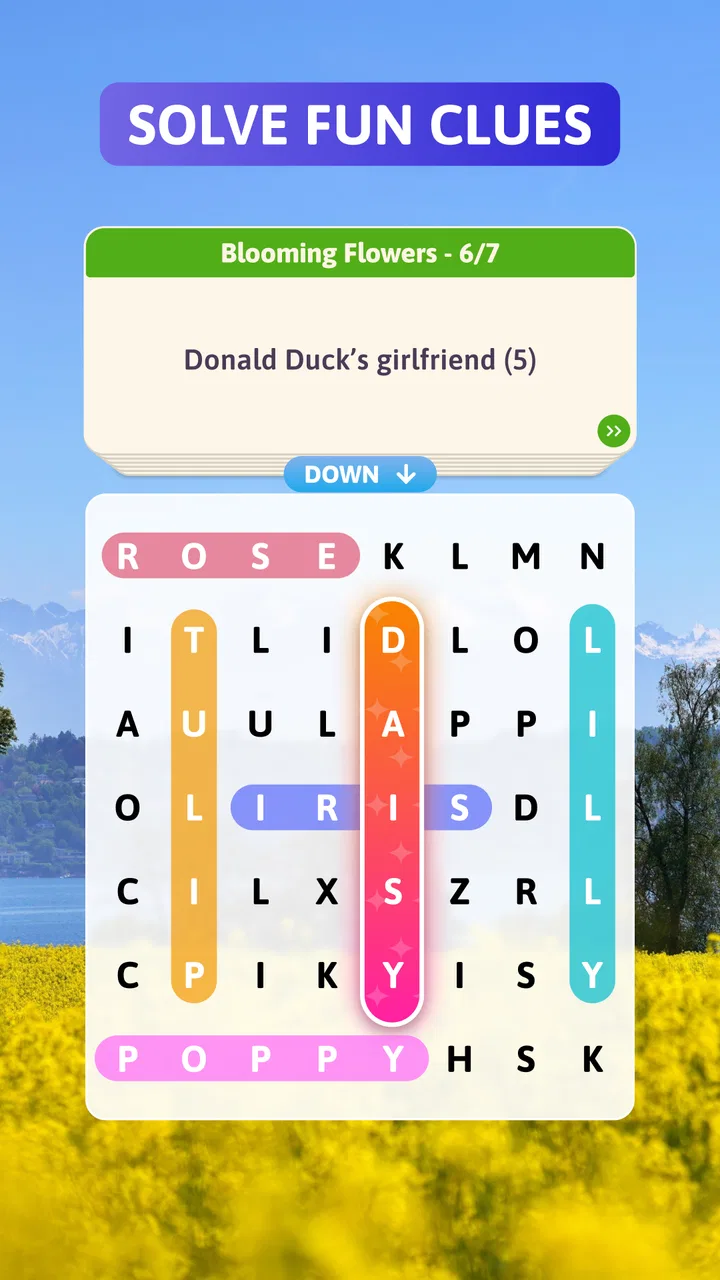
I approached Crossword Search: Word Puzzles expecting a light word game, but its appeal comes from combining two familiar habits: solving a clue and hunting through a letter grid. That mix makes it easy to understand within a few seconds, while still giving each puzzle a little more texture than a standard crossword or a basic word search.
Created by PlaySimple Games, this free word game is aimed at anyone who enjoys short, low-pressure mental breaks. I found it most comfortable to play in spare moments rather than as a long, uninterrupted session. The clues give me a clear starting point, the grid keeps my eyes busy, and the gradual search for an answer feels more active than simply tapping through a list.
The game has an average rating of 4.9 from around 2.4 thousand ratings, with over 100 thousand installs. Those figures suggest that it has found a receptive audience, but they do not tell you whether its particular blend of clue solving and grid searching suits your habits. That is where the practical details matter: how you approach a puzzle, what you do when you get stuck, and whether you enjoy a calm pace more than a demanding challenge.
You May Also Like

 Blood Strike: 2.5 Anniversary
Blood Strike’s Loadouts Turn Every Drop Into a Tactical Gamble
A close look at Blood Strike’s custom loadouts: how fast access to signature weapons reshapes its battle royale rhythm, rewards preparation, and narrows the gap between fights.

 Pandora - Music & Podcasts
Pandora’s Music Is Easy to Start, but Harder to Recover
Pandora’s strength is its low-effort path from a seed to a station. Its weak spot is how much confidence it asks you to place in connection, setup, and quiet recovery.

 8 Ball Pool
 Is Built on Rivalries, Rematches, and Routine
A close look at the rivalries, rematches, shared routines, and unanswered safety questions that turn a quick pool match into a persistent mobile community.

 Samsung Music
’s Quiet Strength Is Playing What You Already Own
Its reach comes less from spectacle than from dependable access to a personal library. That simplicity is both the app’s strongest retention engine and its ceiling.

 AccuWeather: Weather Radar
AccuWeather Review: A Quick, Clear Forecast for Everyday Decisions
For everyday plans, the best forecast is the one you can understand quickly. AccuWeather makes rain timing, radar, and local conditions easy to act on, with a few trade-offs.

 Hill Climb Racing
Why Hill Climb Racing Still Turns Crashes Into One More Run
A tiny car, a bumpy hill and one more upgrade: Hill Climb Racing keeps resurfacing because its simple chaos makes every near-miss feel personal.
More From Our News Desk
View All News


Getting past the first points of friction
The first thing I would tell a new player is not to treat every clue as a conventional crossword clue. The grid changes the task. Instead of writing an answer into a fixed row or column, I have to identify a word and then locate it among surrounding letters. A clue can therefore feel obvious while the actual search still takes time.
That distinction is the most common place to get stuck. I may know the answer but fail to see it because I am scanning in only one direction or concentrating on the middle of the grid. A better routine is to identify the unusual letters in the suspected word, then look for those letters near the edges and corners. Once I find a likely starting point, tracing the rest becomes much easier.
Another small adjustment is to avoid solving clues in the order they appear. I usually begin with the words that come to mind immediately. Finding those first gives me familiar letter patterns and reduces the visual clutter around the remaining answers. If a clue feels vague, I leave it alone rather than spending several minutes forcing a guess.
Why clue knowledge is only half the solution
In a normal crossword, crossing letters gradually confirm an answer. Here, the confirmation comes from finding the word inside the grid. That makes spelling especially important. A word that sounds right in my head can still waste time if I search for the wrong form, singular instead of plural, or a related word that does not match the intended answer.
I also found that the grid rewards a slower first scan. Rapidly dragging across letters can make me overlook a word that runs diagonally or in an unexpected direction. I get better results by checking horizontal lines, then vertical lines, and finally diagonals. This is not a complicated technique, but it prevents random swiping from replacing actual searching.
The best early strategy is to solve the clue and the grid as two separate tasks. First decide what the answer probably is; then search methodically. Mixing those steps together tends to create unnecessary guesses and makes an easy puzzle feel confusing.
Setup checks before blaming the game
Because this is a mobile game, a frustrating start is not always caused by the puzzle itself. I would first make sure the app has finished installing properly and that the device meets its basic requirement. It supports Android 8.0 and later, so an older phone may be the real reason for installation or compatibility trouble.
I would also close other demanding apps before assuming the game is malfunctioning. A word grid should not require much from a modern phone, but limited memory, an overloaded device, or a system that has been running for too long can make taps feel delayed. Restarting the app after closing it fully is a simple check that often separates a temporary device issue from a repeatable game problem.
For a clean first session, I prefer opening the game with a stable connection, allowing the initial screens to finish, and avoiding repeated taps while something is loading. If the interface appears unresponsive, tapping several times can make the eventual response look like a larger problem. Waiting briefly, then restarting once, is usually more sensible than continuing to press every control.
The game is free to download, which makes trying it straightforward. It does include optional in-app purchases ranging from $2.99 to $14.99 per item, so I would check the purchase confirmation carefully if a child also uses the device. The Everyone age rating makes it suitable for a broad audience, but an age rating does not remove the need for ordinary device-level purchase awareness.
A practical routine for recovering a stalled session
When I get stuck on a puzzle, I use a recovery sequence instead of immediately deciding that the answer is missing. First, I reread the clue and consider alternate meanings. Second, I check whether I am looking for the correct word form. Third, I scan the grid from each corner, because a word near an edge is easy to miss when I begin in the center.
If the problem is a missed tap rather than a difficult clue, I slow down and trace the letters in one continuous movement. I avoid drawing back over a letter unless the game clearly requires it, since a hurried gesture can make the intended path unclear. Rotating the phone or changing the way I hold it can also help if my finger is covering part of the grid.
When the whole session feels unreliable, I leave the puzzle, close the game, and reopen it before trying the same clue again. I do not repeatedly uninstall and reinstall as a first response. That is a disruptive step, and it may not address a temporary slowdown or a simple input mistake. A restart is the more proportionate test.
There is also a useful mental recovery method: write down, at least mentally, the clues I have already considered. Otherwise I tend to cycle through the same guesses and search the same lines repeatedly. Marking a clue as “uncertain” rather than “impossible” keeps the puzzle moving without turning the session into a battle with one stubborn word.
When the puzzle is difficult for a good reason
Some frustration comes from the design of this format rather than from a technical fault. A clue may be broad enough to suggest several answers, while the grid offers only one correct match. That can feel less transparent than a traditional crossword with crossing letters. Players who prefer exact, tightly constrained clues may find this style less satisfying.
The opposite is also true. If I enjoy vocabulary but dislike writing long answers into a crossword layout, the grid makes the experience more approachable. I can recognize a word visually and follow it through the letters without managing a complicated arrangement of numbered boxes. That makes the game a good fit for relaxed play, language practice, or a short break when I want something more engaging than passive scrolling.
I would not choose it as my main option for serious competitive word play. The appeal is its accessible rhythm, not a high-pressure contest against other players. Someone looking for timed matches, deep strategy, or a large dictionary challenge may be happier with a dedicated crossword, an anagram game, or a competitive word title. This game works best when the goal is to solve a contained puzzle and enjoy the process.
Everyday situations where it fits well
My favorite use case is a short waiting period: sitting in a reception area, taking a break between tasks, or winding down before bed. I can start a puzzle without needing to remember a complicated storyline or prepare a long session. The clue-and-grid format gives me a clear stopping point, which is useful when I do not want a game that constantly pushes me into “one more round.”
It can also work as a gentle shared activity. One person can read the clue while another searches the grid, or two people can suggest different answers before checking the letters. That kind of cooperation is more natural here than in a game built around rapid reactions. I would still recommend giving each player time to inspect the grid, because an answer that is obvious to one person may be visually hidden for another.
For language learners, the game may be useful as a vocabulary prompt, but I would treat it as supplementary rather than a complete learning tool. A clue can encourage recall, yet the game is designed around solving rather than explaining definitions. I would keep a note of unfamiliar words and look them up separately if learning accuracy matters.
How it compares with familiar word-game alternatives
Compared with a traditional crossword, this format is easier to enter because I do not have to manage crossing answers or fill a rigid layout. The trade-off is that the grid search can feel repetitive if I prefer the deduction created by intersecting words. Crossword fans who enjoy building certainty from several directions may miss that structure.
Compared with a plain word-search game, the clues give the activity more purpose. I am not simply hunting for a visible list of words; I have to interpret each prompt first. That extra step makes the puzzles feel more thoughtful, although players who want completely relaxing visual scanning may find the clue work unnecessary.
Compared with an anagram game, the emphasis is less on rearranging letters and more on recognition and location. I spend less time experimenting with combinations and more time checking whether a possible answer appears in the grid. This makes it a better choice for players who like vocabulary clues but do not enjoy being penalized by a large pile of possible letter arrangements.
The most important trade-off is depth versus convenience. The game is convenient because each puzzle has a compact, understandable structure. It is less suitable if I want a long-term competitive system, elaborate customization, or a word challenge that demands constant strategic planning. Choosing it means choosing a calm, focused format rather than an expansive one.
What the current release means for new players
The current version is 1.60.0, and the game was released on September 25, 2024. For someone deciding whether to install it now, the practical point is that it is an established release rather than an idea that has only just appeared. I would still keep the app updated through the normal store process, especially if a problem affects loading or touch response.
PlaySimple Games is clearly positioning this as a broad-audience word title rather than a specialist puzzle tool. That matches my experience: the rules are quick to grasp, and I do not need a tutorial-heavy introduction to begin. The simplicity is a strength for casual players, though experts may eventually want more variety or a sharper difficulty curve than this kind of accessible design usually provides.
Before installing, I would ask myself one practical question: do I want to search for answers, or do I want to construct them? If the pleasure comes from scanning letters after interpreting a clue, this game is a natural match. If I prefer building words from tiles, filling crossword entries, or competing under a clock, another category will probably fit better.
My verdict after using the clue-and-grid format
I recommend Crossword Search: Word Puzzles to people who want a free, approachable word game for short sessions. Its strongest idea is the balance between recognition and observation: I solve enough of the clue to form a theory, then use the grid to prove it. That creates more involvement than a basic word search without demanding the concentration of a full crossword.
It is not the right choice for everyone. Players who dislike ambiguous clues, repeated visual scanning, or optional purchases may prefer a more traditional puzzle app. It also will not replace a competitive word game for anyone seeking rankings or intense head-to-head pressure. Those are not flaws in isolation, but they define the audience clearly.
For me, the deciding advantage is how easily the game fits around real life. When a word seems missing, I can recover by changing my search pattern rather than abandoning the puzzle. When the app seems slow, I have a sensible set of basic device checks before assuming the game is at fault. That combination of accessible play and manageable troubleshooting makes it a dependable choice for casual word-puzzle sessions.
My final advice is to play it patiently: solve the easiest clues first, search the grid in a fixed pattern, and treat a stuck answer as a clue-reading problem before treating it as a technical one. If that rhythm sounds enjoyable, the free entry point makes it worth trying. If you need deeper crossword deduction or competitive word mechanics, choose a more specialized alternative instead.
FAQs for Crossword Search: Word Puzzles
01What is Crossword Search: Word Puzzles and how does it work?
Crossword Search: Word Puzzles is a word game app that combines elements of crosswords and word searches to challenge your vocabulary and puzzle-solving skills. Players are presented with a grid filled with letters, and the goal is to find and highlight words based on given clues. The game progresses in difficulty, offering various levels and themes.
02Is Crossword Search: Word Puzzles available for both Android and iOS?
Yes, Crossword Search: Word Puzzles is available for download on both Android and iOS devices. You can find it on the Google Play Store for Android users and the Apple App Store for iOS users. The app is designed to provide a seamless experience across different devices and operating systems.
03Does Crossword Search: Word Puzzles require an internet connection to play?
No, you do not need a constant internet connection to play Crossword Search: Word Puzzles. The game can be played offline, allowing you to enjoy solving puzzles on the go without worrying about connectivity. However, some features like updates or in-app purchases may require an internet connection.
04Are there in-app purchases in Crossword Search: Word Puzzles?
Yes, Crossword Search: Word Puzzles offers in-app purchases. These purchases can enhance your gameplay experience by providing hints, unlocking additional levels, or removing ads. While in-app purchases can be helpful, they are entirely optional, and the game can be enjoyed without spending money.
05How does Crossword Search: Word Puzzles cater to different skill levels?
Crossword Search: Word Puzzles is designed for players of all skill levels. It starts with simpler puzzles and gradually increases in complexity as you progress. The game includes various difficulty settings and themed puzzles to cater to both beginners and experienced players, ensuring a challenging yet enjoyable experience for everyone.
Pros
- Intuitive interface for easy navigation.
- Wide range of difficulty levels available.
- Offline mode supports play without internet.
- Daily puzzles keep content fresh and engaging.
- Hints are available for challenging puzzles.
Cons
- Ads can be intrusive during gameplay.
- Limited free hints without purchase.
- Repetitive puzzles may occur over time.
- Some users report occasional app crashes.
- No multiplayer or social features included.

Crossword Search: Word Puzzles
Gallery